Choose your website.
Add a website you own or have permission to monitor. Confirm ownership and choose the pages that matter to your business.
See what changed. Understand what matters. Know what to do next. Website monitoring, thoughtfully designed for the people behind the business.
One-time purchase. Lifetime free software updates.
THE CONSOLE
A focused workspace brings warnings, site health and next steps together—so important details don’t get lost in a wall of technical output.
Try the interactive preview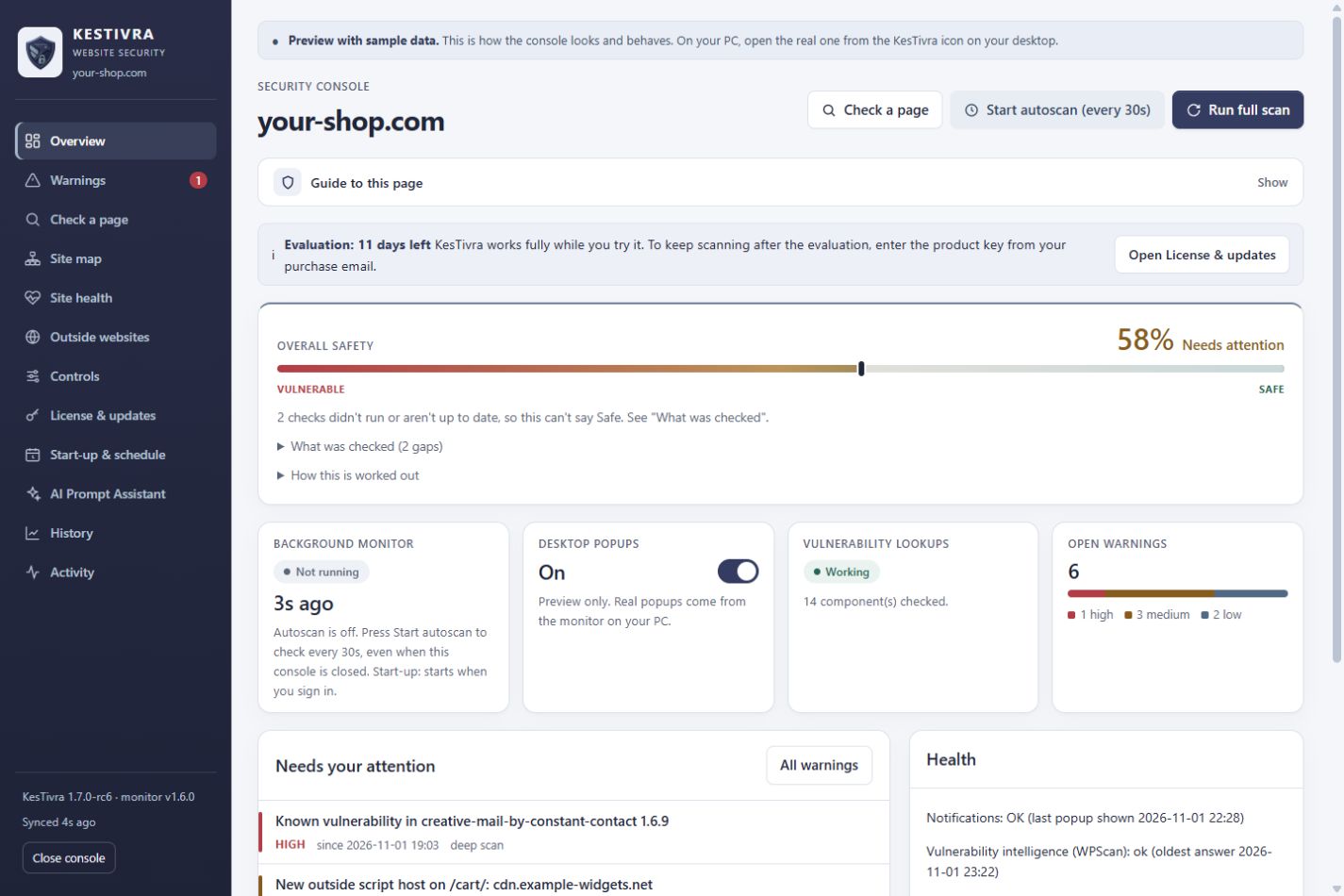 Explore the console
Actual KesTivra interface, shown with illustrative sample findings. No website is scanned in this preview.
KNOW WHERE TO LOOK
KesTivra watches public website signals and organizes the findings into a clear starting point for action.
A public response is missing a recommended browser security header. Review the finding, confirm your hosting settings and choose the appropriate change.
A plain-language explanation, the observed detail and a practical next step—all in one place.
Awareness you can act on. KesTivra monitors and explains. Keep your existing firewall, backups and security updates in place; KesTivra does not block attacks or automatically repair your website.
FROM SETUP TO CLARITY
Add a website you own or have permission to monitor. Confirm ownership and choose the pages that matter to your business.
Set a schedule on your Windows PC. Review homepage checks, full scans and new findings from the console.
Read the explanation, verify the issue and use the guidance to make a change yourself—or discuss it with your website professional.
SIMPLE BY DESIGN
One purchase for the KesTivra desktop app, with future published software updates included.
Professional tools.The launch offer for clearer website security monitoring.
No subscription. Optional third-party services and their fees are separate. Review the license scope and sales terms before purchasing.
HERE WHEN YOU NEED IT
Start with the essentials, understand a finding or prepare a useful support request.
A FEW GOOD QUESTIONS
The desktop launch offer is $49 USD, paid once. There is no selected monthly or annual subscription for the desktop app.
Your paid desktop license includes all future KesTivra software updates we publish, without an update fee. It does not include third-party subscriptions, a promise of particular future features or a separate hosted monitoring service.
KesTivra is a website security monitor. It highlights observable signals and helps you understand the next step. It is not a firewall, a malware-removal service or a guarantee that your website is secure.
No. Desktop monitoring runs on your Windows PC. Your PC must be awake, online and running the monitor. The background schedule and alerts are configured in the console.
KesTivra checks public website signals and includes WordPress-aware version and vulnerability checks. Some component checks depend on what the website exposes publicly. Known-vulnerability lookups require your own optional WPScan account and API token.
The monitor reports what it observes; it does not log into WordPress or automatically edit your checkout or website settings. Any recommended fix should be verified and backed up before you apply it.
Read the evidence, freshness and limitations shown with the finding. Confirm the condition in your own website tools before changing anything. Monitoring cannot prove that every possible security issue has been found.
Use the official Downloads page for release availability. Inside the app, open License & updates. Only install a release with the publisher and signature you expect.
No matching questions. Try another word, or open Get help above.